
About
Foundation Corner
The Leap experience in a corner — a flexible option for limited space or budget.
Fits Into a Corner
No dedicated room needed. The Foundation Lab can be set up in the corner of an existing classroom, community space, or other learning environment.
Learn How to Learn
Built around logic, critical thinking, and creativity, the skills that form the foundation for all other learning.
A Lighter Setup
Hands-on games lead the way, supported by a single tablet — a simpler, more affordable way to bring Leap into any learning space.
What is a Foundation Lab?
The Foundation Lab focuses on Logic — the heart of the Leap methodology. It builds critical thinking, problem-solving, creativity and the skills children need before and alongside literacy and numeracy, helping them learn how to learn.
It is set up as a single Logic station designed to fit into the corner of almost any learning space. Learners use both hands-on games and the tablet helping them learn how to learn. Facilitators can also draw inspiration from the apps to extend the learning through creative, practical activities beyond the screen. While the main target group is children up to age 10, the foundational skills it develops are relevant at any age.
Where It Lives
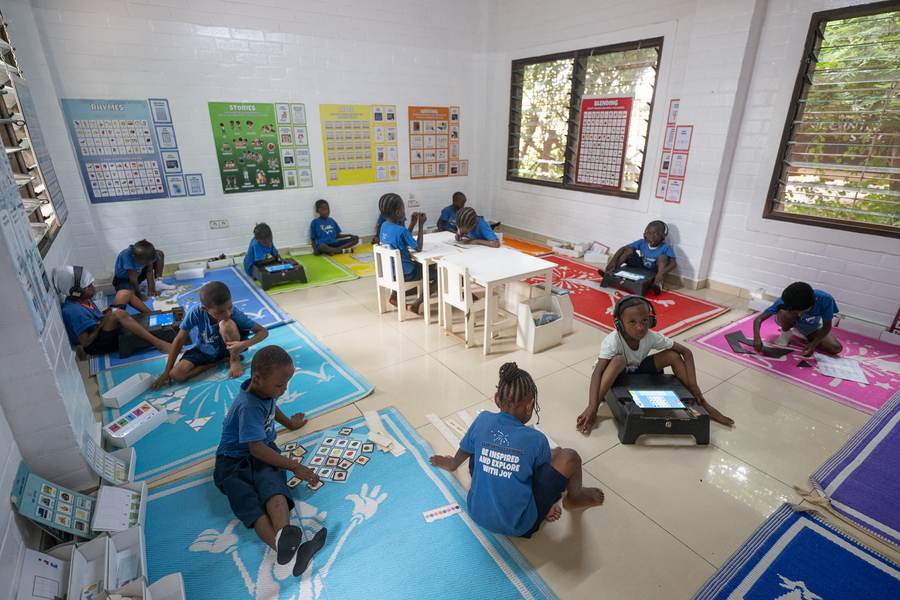
The lab fits easily into an existing learning space, so no dedicated room is needed.
How It Works
A lighter setup, but the same idea: learners learn by doing, at their own pace.
The Corner is Set Up
Turquoise mats, logic banners, boxes of hands-on games, and a tablet with digital activities are arranged in the corner of the learning space.
Learners Play and Explore
Learners work mainly with the hands-on games, building logic and creativity skills. The single tablet is there for the facilitator and small groups to reinforce learning and draw ideas from.
The Facilitator Guides
Using the same Leap methodology as the full lab, the facilitator helps learners explore, ask questions, and discover, rather than lecturing.
What You Need To Set It Up
Everything the Foundation Lab needs is compact and low-cost.
A Corner of a Room
Just a corner of an existing room. No dedicated space, no rearranging what is already there.
Printed Games and Banners
Turquoise mats, banners, station cards, and hands-on games bring the Logic station together. A small selection of foundational literacy and numeracy games is also included, giving learners a chance to apply these skills when they are ready.
One tablet
The Foundation Lab can work with a single tablet, but the setup can be expanded based on budget, space, and learner needs. The tablet supports the games rather than replacing them.
A Facilitator
Someone trained in the Leap methodology to guide the learners, keep the corner active, and make sure every learner learns something new. Training and support materials are provided.
Start Small, Grow With Leap
Setting Up the Corner
Leap or a partner provides the materials, apps, training, and ongoing support needed to bring the Foundation Lab to life.
Growing Into a Full Lab
The Foundation Lab can be a natural first step, with the option to expand into a full Leap Learning Lab as needs and capacity grow.
Pricing
A Lower-Cost Entry
With a smaller set of materials and a flexible tablet setup, the Foundation Lab offers a more affordable way to bring Leap into a learning space.
Simple Ongoing Costs
Yearly costs are limited to app licensing and follow-up support, based on the app collections and setup used. These remain minimal while supporting new apps, levels, content, and ongoing guidance.
Room to Grow
Start small and expand into a full Leap Lab over time, building on what the corner has already put in place.
Good to know
- Designed for children up to age 10, and works as a foundation for all ages.
- Hands-on games are the focus. The tablet supports learning rather than driving it.
- The app works fully offline. Once installed, no internet connection is needed during sessions.